...is a seat controller plus a lot more. Now, QMs will get to see all the information about the question set that
those pesky coaches see with their new fangled tablets.
Want to see the latest on pqo-Quiz Master features? Scroll down, or click here.
This tool was developed to be visually similar to the seat controller software many BQF ministries have used for years.
Download now.
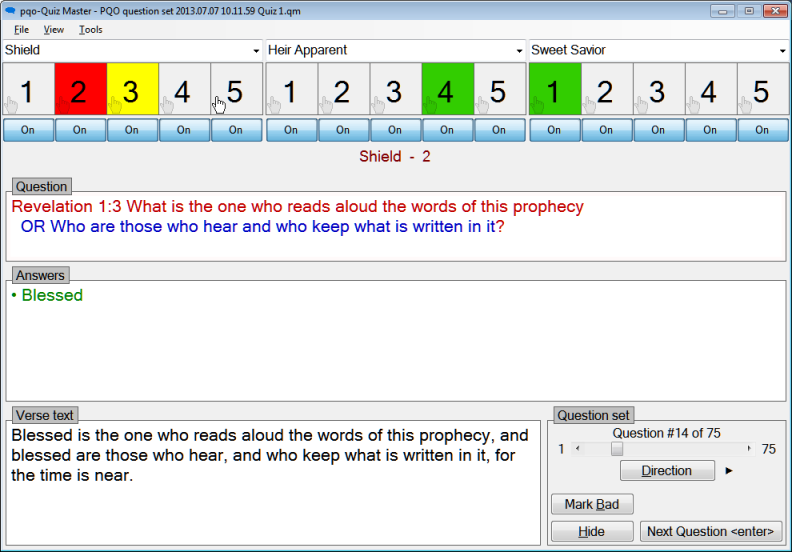
Although similar, there are some difference. Looking at each section of the display, starting with the
team area...
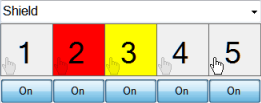
• Available team names are shown in a drop down list - editing a team name will automatically add it to the set of remembered names.
• Jump order colors (red and yellow above) are fully configurable.
• Seats 'lights' are displayed just as in earlier tools, but with one significant modification. Note the white hand icon on seat 5; this
denotes a finger jumper. No longer required to hold the pad button down for long periods of time and release it to jump, these quizzers can now press a pad
button to trigger a jump! No more hand cramps or crazy contraptions because of a quizzer's disability or injury.
In the
Question area, text is displayed in unique (and configurable) colors and font size with alternate question forms shown on separate lines...

• Dark red denotes the primary question.
• Light red denotes additional primary question information that does not get read.
• Dark blue denotes an alternate question form.
• Light blue (not shown) denotes additional alternate question information.
• Don't like the rainbow? All the colors can be turned off by a single menu selection.
In the
Answer area, text is displayed in unique (and configurable) colors and font size...
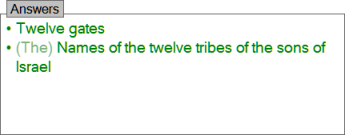
• Dark green denotes required answer words.
• Light green denotes non-required, but frequently spoken answer words.
• When more than one answer exists they are shown on separate lines, each starting with a bullet.
In the
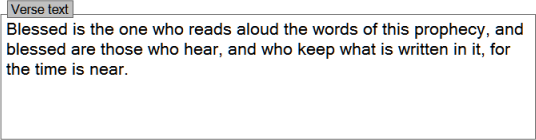
Verse area, text is displayed in a unique (and configurable) color and font size...
In the
Question set area, are the controls for managing a quiz...
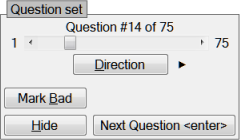
• The scroll bar can be used to quickly navigate across large numbers of questions.
• The Direction button can be used to reverse the order of questions in a quiz. This is useful in rooms where nearby quizzing makes it possible to hear upcoming questions.
• The Mark Bad button provides a way to quickly mark a question as bad, and move on with the quiz. Two clicks plus some optional notes. Later, the QM can review the questions and choose to submit them, or not.
• The Hide button toggles the display of questions before a quiz, or during half-time.
• The Next Question button advances to the next question, marking the current question as having been read.
There are many more options, some of which are shown and described below.
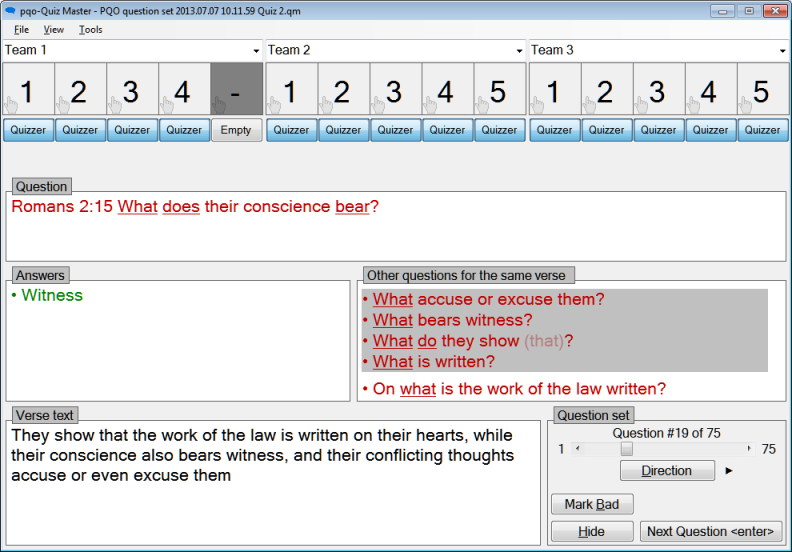
• In the team area, some QMs may prefer to see Quizzer/Empty labels for seats as opposed to On/Off.
• In the Question area, the underlines highlight words that do not appear verbatim in the verse text. When a quizzer forms the question "What their conscience bears?" all the variations are underlined words, cluing the QM into the fact that they are likely added helping verbs or conjugation variances in the question.
• In the Other questions... area, we see other question relating to the same verse, those with the same interrogative are sorted to the top. Particularly when working with one word or less, this information helps the QM to answer the question "Does the question formed by the quizzer more closely match one of the other questions from the verse?" When it does, the quizzer has incorrectly formed the question.
What's new with pqo-Quiz Master ?
pqo-Quiz Master can now generate quizmeets without needing access to the internet or transporting quizzes on thumb drives.
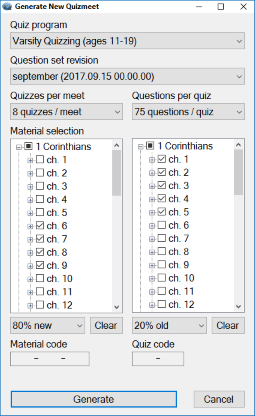
Just like with pqo-Randomizer select the Quiz program, Question set revision, Quizzes per meet, Questions per quiz, Material selection and New/Old %, then click the Generate button.
• The generated quizmeet will be just like those available with pqo-Randomizer with its consistency and question balance.
• Entire quizmeets are generated at once so this is a once-a-day task, not once before every quiz.
• Available Question set revisions are accumulated from quizmeets that are opend via *.zip files or downloaded from the internet. For more on this read on.
We've also provided a mechanism to ensure proper Material Selection. Notice the Material code entry highlighted below in red.
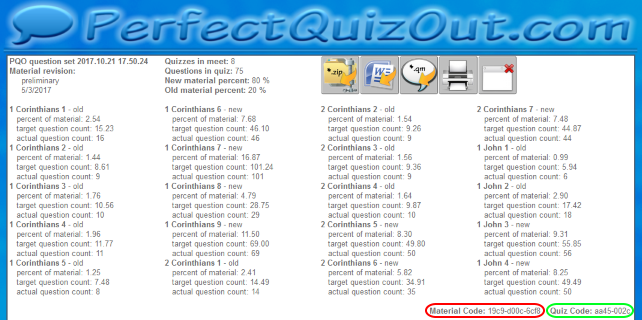
Ministry heads can distribute this code to Quiz Masters. When entered into pqo-Quiz Master while generating a quizmeet, it requires that Material selection match that of the online generated quizmeet from which the code was harvested. The Material code ensure that...
• The correct Question set revision has been selected.
• The correct Quizzes per meet and Questions per quiz have been selected.
• The correct Material has been selected.
• The correct New/Old % has been selected.
There was a situation at the 2017 National tournament wherein one quiz site generated a quiz with the wrong material selection, greatly disappointing some quizzers. This feature can ensure such an accident can't happen.
What's more, a ministry head can even pre-evaluate quizmeets using pqo-Randomizer and select the one that he or she desires to use in each room, without having to ditribute that meet on thumb drives Notice the Quiz code entry highlighted above in green. Entering that code into pqo-Quiz Master will allow the generation of the same quizmeet in each quiz site. This feature allows...
• Restoring the balance of having all quiz sites and teams experience the same quizzes.
• Pre-evaluation of quizmeets without loosing the simplicity of in-room quizmeet generation.
• Transparency and reproducability of quiz generation and anomaly evaluation.
• QMs can still reverse a quiz's questions if quiz site proximity demands.
Finally, when given access to the internet, pqo-Quiz Master can download question set updates with just a few clicks.
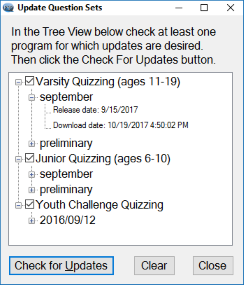
Easy as 1, 2, 3.
• Select Update question sets from the Tools menu.
• Check or uncheck the quiz programs for which to download Question sets.
• Click Check for updates.
Updates are downloaded and saved locally. And, as mentioned above, any time a PQO Quizmeet *.zip file is opened, the question set revision will be harvested from that as well, giving a non-internet based mechanism for keeping pqo-Quiz Master updated with the latest Question set revisions.
Download now.